<Determinant, Least Square>
1. Install Packages
2. Determinant
3. change of Basis
4. Least Square
Install Pacakges
# visualization을 위한 helper code입니다.
from urllib.request import urlretrieve
URL = 'https://go.gwu.edu/engcomp4plot'
urlretrieve(URL, 'plot_helper.py')

import sys
sys.path.append('../scripts/')

# 다음 세 custom function (1)plot_vector, (2)plot_linear_transformation, (3) plot_linear_transformations
# 을 사용할 것입니다.
from plot_helper import *


import matplotlib.pyplot as plt
import numpy as np
from mpl_toolkits.mplot3d import Axes3D
import scipy as sp
import scipy.linalg
import sympy as sy

sy.init_printing()
np.set_printoptions(precision=3)
np.set_printoptions(suppress=True)


def plotVectors(vecs, colors, alpha=1):
    """
    Determinant 섹션의 plot에 사용하기 위한 custom function입니다.

    Parameters
    ----------
    vecs : plot할 vector(numpy array)의 list  (e.g., [[1, 3], [2, 2]] )
    colors : 각 vector의 color  (e.g., ['red', 'blue'])
    alpha : 투명도

    Returns
    -------
    fig : figure
    """
    plt.axvline(x=0, color='#A9A9A9', zorder=0)
    plt.axhline(y=0, color='#A9A9A9', zorder=0)

    for i in range(len(vecs)):
        if (isinstance(alpha, list)):
            alpha_i = alpha[i]
        else:
            alpha_i = alpha
        x = np.concatenate([[0,0],vecs[i]])
        plt.quiver([x[0]], [x[1]], [x[2]], [x[3]], angles='xy',
                   scale_units='xy', scale=1, color=colors[i],alpha=alpha_i)
Determinant
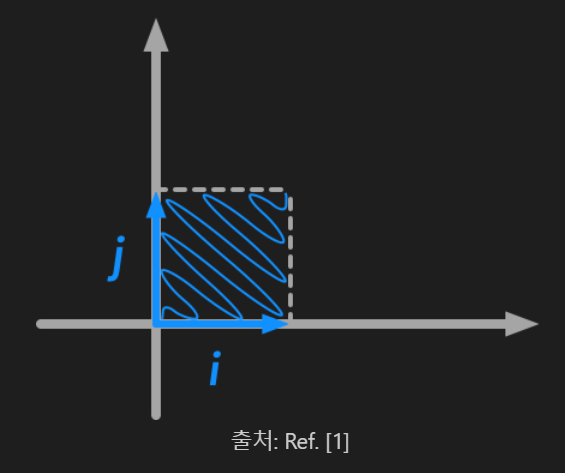
- Matrix = Linear Transformation
- Determinant = 이러한 Transformation이 일어날 때, multiplicative change 가 일어나는 정도
- 어떠한 input이 Matrix A를 통과하게 되면 부피(volume)가 얼마나 변하는가
- 어떠한 input이 Matrix A를 통과하게 되면 방향(orientation)이 변하는가
orange = '#FF9A13'
blue = '#1190FF'

i = [0, 1]
j = [1, 0]

fig = plt.figure(figsize = (4,4))
plotVectors([i, j], [[blue], [orange]], alpha=1)
plt.plot([0, 1], [1, 1], ls = '--', color = 'black', alpha = .5)
plt.plot([1, 1], [0, 1], ls = '--', color = 'black', alpha = .5)

plt.xlim(-0.5, 3)
plt.ylim(-0.5, 3)
plt.show()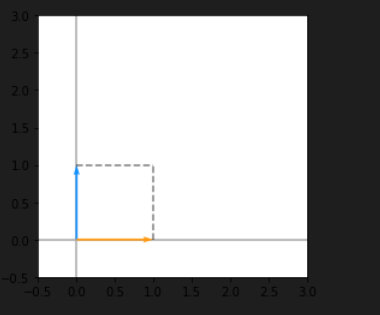
volume
위 vector를 Matrix A = [[2, 0], [0, 2]]에 통과시키면,
A = np.array([[2, 0], [0, 2]])

new_i = A.dot(i)
new_j = A.dot(j)

fig = plt.figure(figsize = (4,4))
plotVectors([new_i, new_j], [[blue], [orange]])
plt.plot([0, 2], [2, 2], ls = '--', color = 'black', alpha = .5)
plt.plot([2, 2], [0, 2], ls = '--', color = 'black', alpha = .5)

plt.xlim(-0.5, 3)
plt.ylim(-0.5, 3)
plt.show()
- A는 Diagonal Matrix이기 때문에 i, j를 각각 2배로 rescale (i, j → 2i, 2j)
- 주황색, 파란색 vector는 rotate, reflection 등이 없이 각자 2배 길어짐
- 넓이는 4
np.linalg.det(A)
→ 넓이가 1에서 4, 즉 volume이 4배가 됐는데 이는 A의 determinant와 일치한다.
orientation
i, j로 이루어진 unit cube에 B = [[-2, 0], [0, 2]]를 통과시키면,
orange = '#FF9A13'
blue = '#1190FF'

i = [0, 1]
j = [1, 0]

fig = plt.figure(figsize = (4,4))
plotVectors([i, j], [[blue], [orange]])
plt.xlim(-0.5, 3)
plt.ylim(-0.5, 3)
plt.show()
B = np.array([[-2, 0], [0, 2]])
new_i_1 = B.dot(i)
new_j_1 = B.dot(j)

fig = plt.figure(figsize = (4,4))
plotVectors([new_i_1, new_j_1], [['#1190FF'], ['#FF9A13']])
plt.xlim(-3, 0.5)
plt.ylim(-0.5, 3)
plt.show()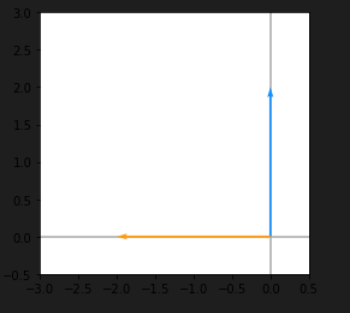
- 주황색, 파랑색 vector의 길이가 2배가 됐음은 동일
np.linalg.det(B)
→ 절대값이 4이긴 하지만, 앞에 - 부호가 붙어 방향(orientation)을 보존하지 못함
이와 같이, determinant의 절댓값은 크기(volume)가 변화하는 정도, 부호는 방향(orientation)의 변화 여부를 알려준다.
change of Basis
모든 vector는 Basis vector의 Linear Combination으로 표현 가능
vector v = (-3, 0)를 R2의 Basis {a=(2, 1), b=(1, 2)}의 Linear Combination으로 나타내고 싶다면,
C = np.array([[2,1],[1,2]]) # 각 column이 a,b인 행렬Basis{a=(2, 1), b=(1, 2)}를 사용했을 때의 좌표, Cx = v를 만족하는 x를 구해야한다.
v = np.array([-3,0])
x = np.linalg.solve(C, v)  # numpy의 solve 함수를 이용해서도 Ax=b의 해를 구할 수 있습니다
x
→ vector v는 {a, b}의 Basis에서 좌표가 (-2, 1)이 된다.
a = np.array([2,1])
b = np.array([1,2])
plot_change_basis (a, b, v)  # standard basis에서 {a,b} basis로 바꿔주는 custom function 입니다.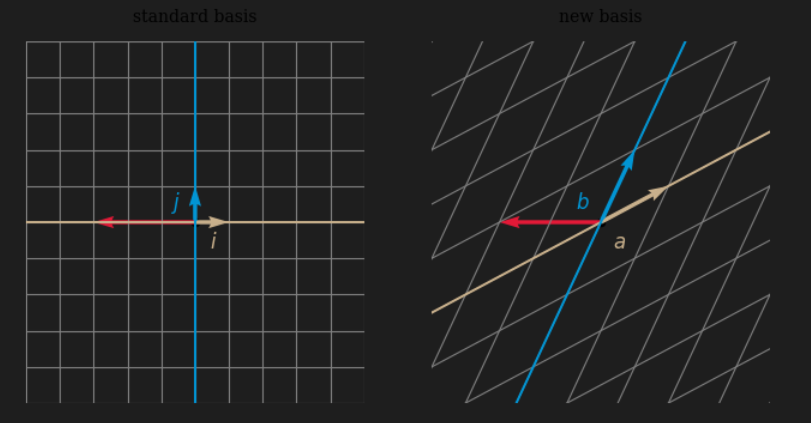
- 빨간색 vector는 v, 갈색 vector는 i와 a, 파란색 vector는 j와 b
- 왼쪽 plot에서 v는 -3*i + 0*j이고 좌표는 (-3, 0)
- Standard Basis에서의 좌표
- 오른쪽 plot에서 v는 -2a + 1b로 표현되고 좌표는 (-2, 1)
반대로, {i, j}의 좌표를 {a, b}의 좌표로 변환시키려면 Inverse C를 곱하면 된다.

어떤 vector를 Standard Basis 상에서 x를 반시계 방향으로 90도 회전하고 싶은데, x의 {a, b}에서의 좌표만이 주어져 있을 때,
- {a, b}의 좌표를 {i, j로} 바꾼다 (change Basis: C)
- {i, j} 상에서 반시계 방향으로 90도 회전을 한다(Linear Transformation: R)
- 다시 {i, j}의 좌표를 {a, b}의 좌표로 옮긴다 (change Basis: Inverse C)
이 셋을 연달아 수행하면 Basis {a, b}에서의 Linearly Transformed 된 좌표를 얻을 수 있다.

x = np.array([-2, 1])

# 1
x_1 = C@x
print('1. x_ij:',x_1)

# 2
R = np.array([[0,-1],[1,0]])
x_2 = R@x_1
print('2. rotated_x_ij:',x_2)

# 3
C_inv = np.linalg.inv(C)
x_3 = C_inv@x_2
print('3: rotated_x_ab:', x_3)
Least Square
Least Square
- Ax = b의 해가 존재하지 않을 때, 그나마 Ax의 값이 b와 가장 가까운 (둘 사이의 L2 norm을 가장 작게 하는) x


- Error E를 minimize 하는 x를 찾는 문제
- b가 A의 Column Space 안에 존재한다면 E = 0을 만드는 x가 존재
- b가 A의 column Space 밖에 있다면, E는 0보다 큼
- x는 다음 식으로 구할 수 있다.
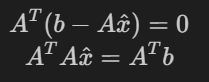
- (Transpose A)(A)가 Invertable 하다면,

example)
1. 위의 공식 이용
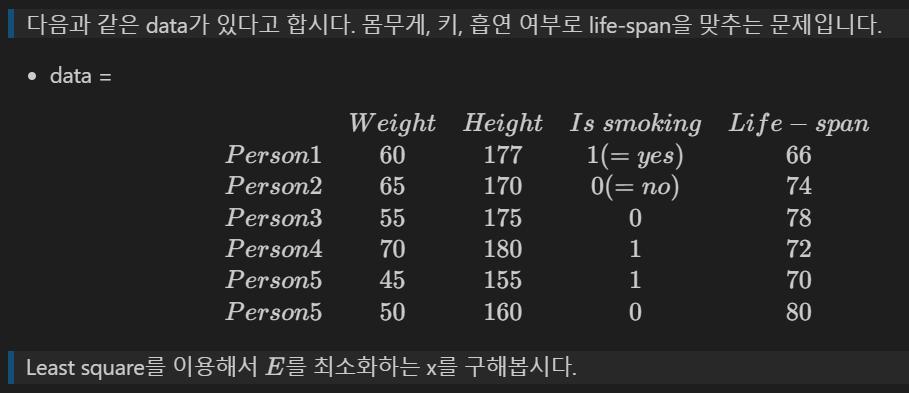
b = np.array([66, 74, 78, 72, 70, 80]).reshape(6, 1)
# (1) Weight만 사용해서 life-span을 예측해봅시다.
A_1 = np.array([60,65,55,70,45,50]).reshape(6,1)
x_1 = np.linalg.inv(np.transpose(A_1)@A_1)@np.transpose(A_1)@b # (hint: A^TA is invertible)
error_1 = sum((b - A_1@x_1)**2) # error 1들의 sum of squared
# (2) Weight, Height 2개를 이용해 life-span을 예측해봅시다.
A_2 = np.array([[60, 177], [65, 170], [55, 175], [70, 180], [45, 155], [50, 160]])
x_2 = np.linalg.inv(np.transpose(A_2)@A_2)@np.transpose(A_2)@b # (hint: A^TA is invertible)
error_2 = sum((b - A_2@x_2)**2) # error 2들의 sum of squared
# (3) Weight, Height, Is smoking 모두 사용해서 life-span을 예측해봅시다.
A_3 = np.array([[60, 177, 1], [65, 170, 0], [55, 175, 0], [70, 180, 1], [45, 155, 1], [50, 160, 0]])
x_3 = np.linalg.inv(np.transpose(A_3)@A_3)@np.transpose(A_3)@b # (hint: A^TA is invertible)
error_3 = sum((b - A_3@x_3)**2) # error 3들의 sum of squared
print("error_1: %.4f, error_2: %.4f, error_3: %.4f"%(error_1, error_2, error_3))
2. np.linalg.lstsq 이용
A = A_3
x_4 = np.linalg.lstsq(A, b, rcond=None)[0]
error_4 = sum((b - A@x_4)**2)
error_4
3. optimize.curve_fit 이용
from scipy import optimize

# 주의: 이 방식은 속도 등을 고려하지 않은, 예시 코드입니다.
def func(data, x_1, x_2, x_3):
  return data[0]*x_1 + data[1]*x_2 + data[2]*x_3

weight = []
height = []
smoke = []

for item in A:
  weight.append(item[0])
  height.append(item[1])
  smoke.append(item[2])

x_5 = optimize.curve_fit(func, xdata = [weight, height, smoke], ydata = list[b])[0]
error_5 = ((A@x_5 - b)**2).sum()
error_5
'Mathematics > Linear Algebra' 카테고리의 다른 글
| Advanced Eigendecomposition (0) | 2022.05.12 |
|---|---|
| Eigendecomposition (0) | 2022.05.11 |
| Gram-Schmidt orthonormalization & QR decomposition (0) | 2022.05.09 |
| Basis, Span, Change of Basis (0) | 2022.05.03 |
| Linear System, Inverse Matrix, Linear Combination (0) | 2022.05.02 |


